Skip to content
Free for employeesNo advertising, no trackingServers in Germany
Hospitality

Rotas, team and shift swapsin one place.

JERION Team is the staff app for JERION — shifts, working hours, leave and swaps on the phone, instead of on a sheet of paper by the dish pit.

My hours

Wk 37 · 24 h of 30 h

App

Recorded at the venue — JERION Team shows the result.

Good morning, Lena

Next shift · Service · 16:00

App

Rota · Thursday

Kitchen · Service

  • Lena16:00 – 23:00
  • Tom11:00 – 19:00
  • Aylin18:00 – 00:00

My requests

1 waiting for approval

  • Swap · Sat 14 MarOpen
  • Leave · 7–13 AprApproved
RotaTeam weekWorking hoursLeave & absenceShift swapsOpen shiftsContract & supplements

A rota app built for hospitality teams.

Not from a meeting room but inside a working restaurant — with late shifts, last-minute changes, and people who have no time for software between the bar and the kitchen.

Less chaos per shift

No group chat with an endless scrollback, no change that three people missed, no misreadings of a sheet on a wall.

More time for the actual job

Your plan, your hours, your team — looked up rather than asked after, and without anyone maintaining a spreadsheet in the evening.

Properly recorded

Hours, breaks and changes sit in the system rather than getting lost inside a message.

Origin

Built in a working venue, not in a meeting room.

JERION was built inside a working restaurant — because the till, the kitchen and the rota had to work together there every day, not because it looked like a market.

That is why JERION Team comes first: the rota is the part everybody needs, not just management. A printout from Monday does not know that Wednesday changed. An app does.

And the rest of the system — till, kitchen display, reservations — is marked in progress for the same reason: it runs in one venue, but it is not yet something you can buy.

The rota, without the aggravation.

Three questions asked in every venue every day — and what JERION Team answers.

  1. Am I on today?

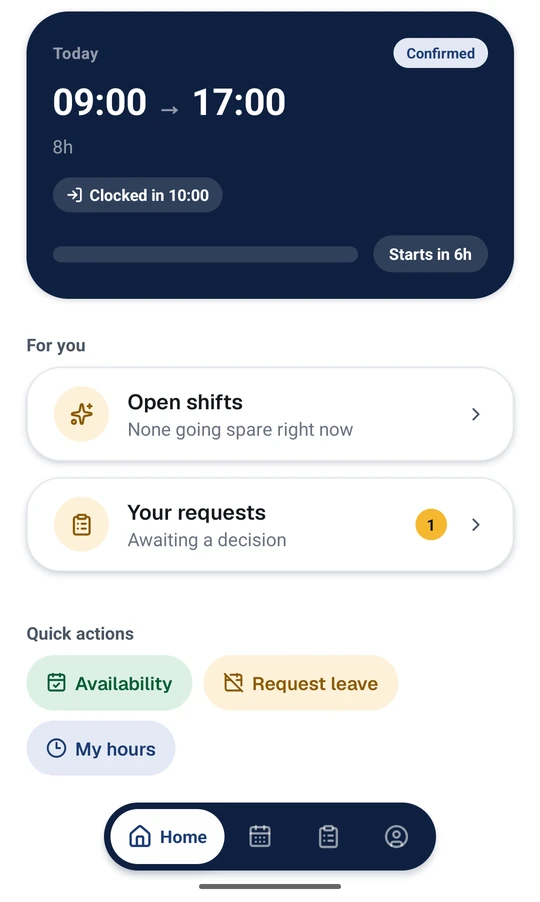
    Today's shift is at the top.

    Start, end and length, whether you are clocked in, and how long until it begins. Below that, shifts left open to pick up and anything still waiting on a decision.
  2. And next week?

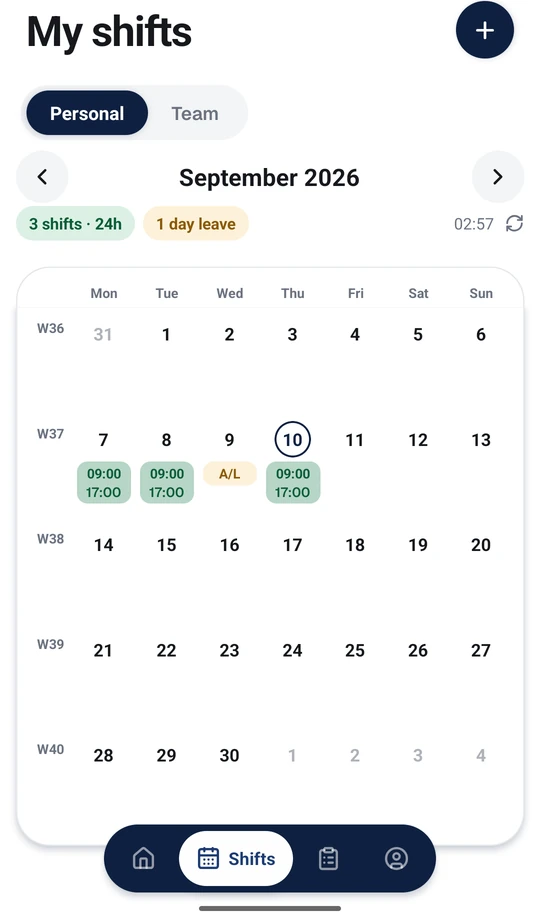
    Week and month at a glance.

    Your own shifts and the team's, changes visible straight away. Alongside them the hours recorded at the venue — clocking happens on the terminal, JERION Team shows the result.
  3. I need Saturday off.

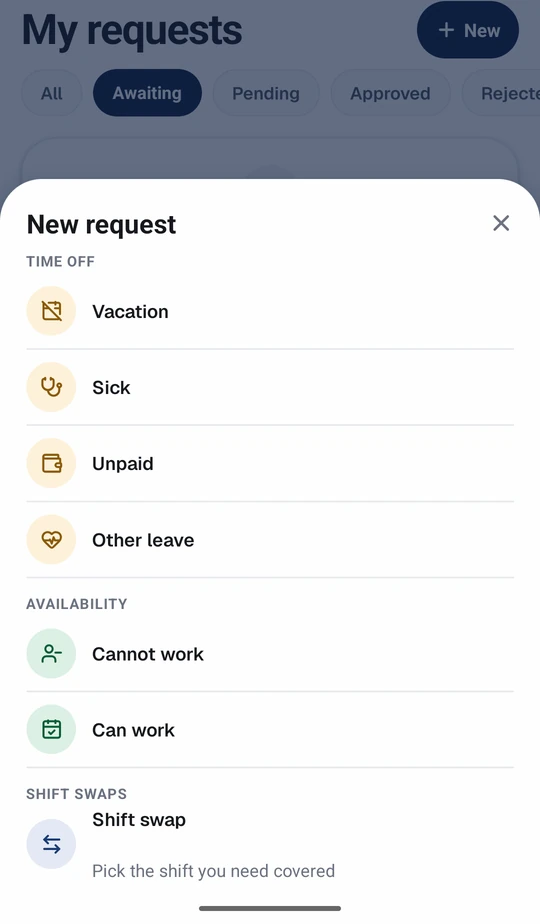
    A request instead of a phone call.

    Leave, sickness, availability or a swap — with a status you can follow rather than “I'll go and ask”. On a swap your colleague agrees first, then management.

Everything the team would otherwise go looking for.

From the rota to the employment contract — in one app instead of four channels.

Shift swaps with two consents

Your colleague agrees first, then management approves. Nobody ends up down for a shift they knew nothing about, and the trail stays followable instead of disappearing into a chat.

Common questions

Open shifts, instead of ringing round

A shift is opened for applications and whoever can take it says so. Availability given in advance shows who need not be asked at all — and nobody spends the evening working through the phone list.

How the team gets in

Notifications

Answers to your requests, shifts that have just opened, and requests from the people you work with — where you are already looking.

Team rota

Who is on with you this week. The schedule only — no contracts, no pay rates, no requests.

Contract & supplements

Contract type, weekly hours, hourly rate and the supplements for Sunday, public holiday and night work. There when you need them.

Availability

Say in advance when you can and cannot work, instead of being asked again every week.

Privacy

A workplace app that behaves like one.

JERION Team is not a social network and does not act like one. The app declares exactly one technical permission — internet access — so it can talk to your employer's server. Nothing else.

Read the privacy policy

No tracking

No advertising, no advertising ID, no analytics SDKs. Nothing goes to data brokers and nothing is sold.

No location

No access to location, camera, microphone, contacts or photos. Not even optionally.

Servers in Germany

Stored and processed in a German data centre — that is, inside the EU.

Your workplace decides

Your employer is the controller of your employee data. We only run the system on their instructions.

Signing in

You get JERION Team from your workplace.

You cannot register an account inside the app. Accounts are created by management, so you need your workplace's company code and your own login details.

That company code is also why the app can only talk to servers under wirtmate.com: there is no free-text server address field for someone to repoint on a phone left unlocked for ten seconds.

How the team gets in

  1. 1Install the app and enter the venue's company code.
  2. 2Sign in with the work email address management set up.
  3. 3That's it. Shifts, hours and requests are there.

Getting the app

Where to get JERION Team.

JERION Team is distributed through Google Play and the App Store. Both listings are being prepared — the links appear here as soon as they are public.

Google PlaySoon
App StoreSoon

Until then your workplace gives you the install link. A link shaped like jerion.de/app/<companycode> opens the app on the right venue, so you never type the code at all.

In progress

JERION Team is the start, not the whole thing.

JERION is meant to run the whole venue on one set of records — till, kitchen, reservations and staff. Those parts are in development and are not available yet. What is available is the app on this page.

  • JERION ERPSoon

    Purchasing, stock, invoices and the accounting export on one set of records.

  • JERION POSSoon

    Till and kitchen: the order, the receipt, the fiscal signature and payment.

  • JERION TeamAvailable

    Rota, working hours, leave and shift swaps — the app for the team.

  • JERION OrderSoon

    Reservations, pre-orders and events, in the same plan as everything else.

  • JERION ControlSoon

    Reporting, the daily close and oversight across every venue.

Till & billingSoon

Tables, courses, sides, split bills, cash and card on one invoice.

Kitchen displaySoon

Dockets on a screen in the kitchen instead of a roll of paper in the pass.

Reservations & eventsSoon

Table bookings, room hire with minimum spend, deposits and pre-orders.

Supplier invoicesSoon

Incoming invoices read rather than retyped, with the original PDF kept on the record.

ReportingSoon

Daily close, cash count, tips split by payment method and revenue per item.

Fiscal complianceSoon

TSE signing under KassenSichV, DSFinV-K for a cash inspection, and DATEV export.

Questions

Common questions

What people most want to know before they install the app.

Not here?

Questions about your own data go to your workplace first — they are the controller. Everything else is in the privacy policy.

Access & signing in

Can I register an account myself?
No. Accounts are created only by management. Without a company code and your own login details there is nothing to see in the app — not even a demo view.
I do not know my company code.
Ask at your workplace. Usually you get a link shaped like jerion.de/app/<companycode> instead — you do not type that, you just open it on your phone.
I have a new phone. What now?
Install JERION Team, enter the same company code, sign in — done. Your shifts live on the server, not on the device. Sign out on the old phone before you pass it on, or a signed-in session stays behind on it.

Privacy

Can my workplace see where I am?
No. JERION Team requests no location access at all — the permission is not in the app. Nor camera, microphone, contacts or photos. It is set out in the privacy policy, section 4.
Can colleagues see my hourly rate?
No. The team rota shows only who is on when. Contract, weekly hours, hourly rate and supplements are visible to each person for themselves only.
How do I delete my account?
The page Delete your account and data sets out the route, the timescale and what has to be kept for legal reasons. If you only want to stop using the app, signing out and uninstalling is enough.

Day to day

Do I clock in using the app?
No. Clocking happens on the terminal at the venue. JERION Team shows you what was recorded there: this month's hours, whether you are clocked in right now, and whether a break is running.
Does the app cost me anything?
No. JERION Team comes with JERION, and your workplace has JERION. For employees the app is free and carries no advertising.
What happens if I leave the job?
Management deactivates your account and you can no longer sign in. What happens to your data after that, and the periods that apply, is set out in the privacy policy, section 9.

For venues

Do you run a restaurant?

JERION Team comes with JERION: you plan the shifts, the team sees them on their phones. Tell us how your rota gets made today and we will tell you honestly whether this is ready for you yet.

Employees with questions about their own data can reach us via privacy — though your own workplace is the first port of call.